Modbus TCP
The Indy API supports Modbus TCP, one of the industrial fieldbus communication protocols. Modbus TCP is primarily used to receive robot data from external devices (PC, PLC, peripherals, etc.) and to issue commands to the robot.
Typically, robot configuration, teaching (teaching), and robot programming tasks are performed through the Neuromeka teaching pendant app Conty. Commands to execute/stop registered robot programs can be performed from external devices using not only Conty but also IndyDCP or Modbus TCP.
Modbus TCP uses dedicated communication and communicates through the TCP/IP network protocol. To use the TCP/IP protocol, the control box must be connected to the external device using Modbus TCP via Ethernet. The controller of the control box driving the robot acts as a slave (server), and multiple masters (clients) can be connected. The table below is the connection information for the Modbus TCP server.
| Item | Details |
|---|---|
| IP Address | Ethernet IP address of the robot |
| Port Number | 502 |
| Connection Backlog | 32 |
| Request Processing Interval | 10ms (additional delay depends on communication load) |
Modbus TCP Robot Programming Method through Conty
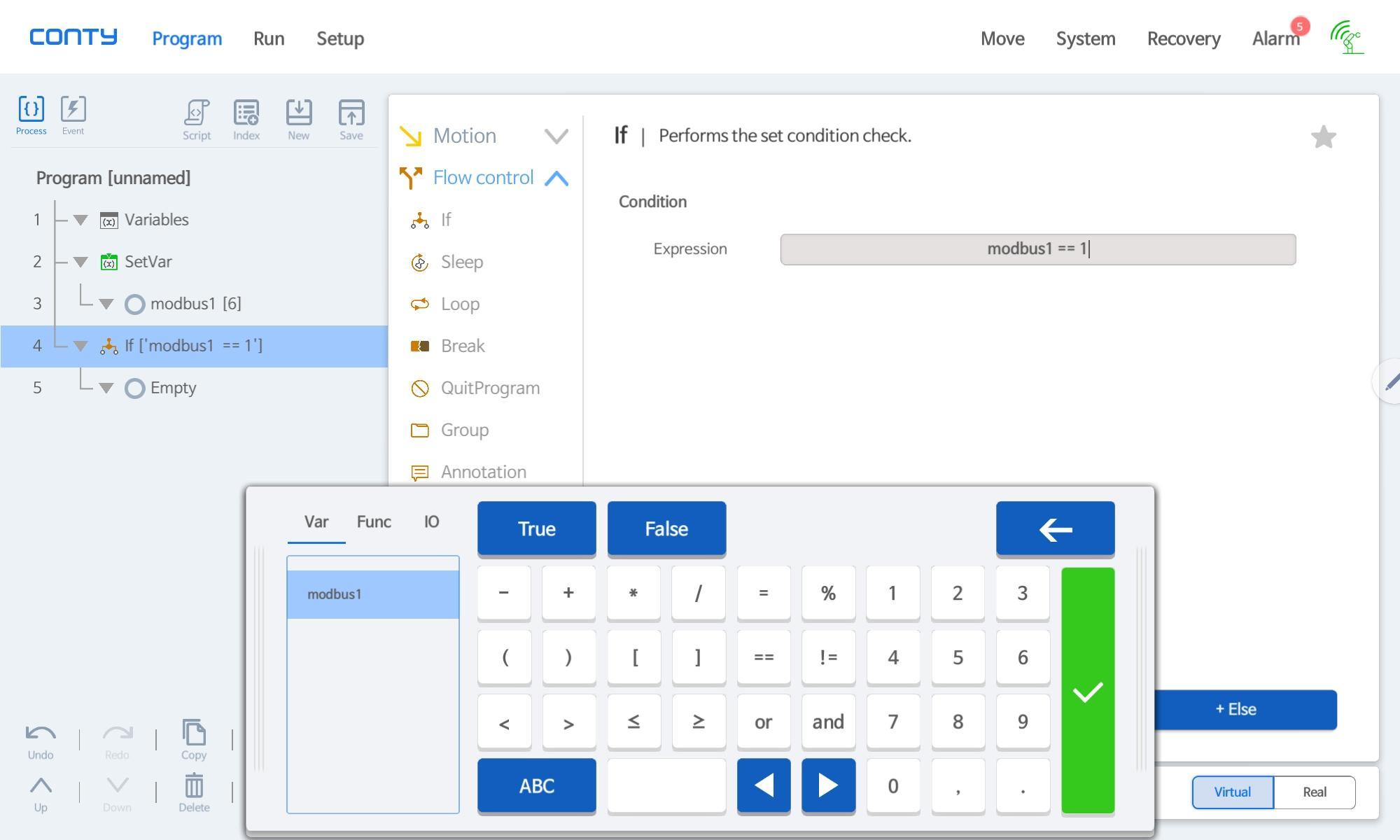
In Conty, Modbus variables can be defined through the Variables command, and values can be assigned to the variables through the SetVar command. Additionally, logic based on defined Modbus values can be implemented through 'expression' input in condition commands such as If.
Below are examples of SetVar and conditional input in Conty.

Memory Address Information
Modbus TCP supports coils (bit-wise addresses) and registers (16-bit addresses), but the Indy API primarily uses registers.
The tables use zero-based PDU addresses. Use FC03/FC04 to read registers and FC06/FC16 to write them.
Registers 0 ~ 999 are user areas, where users can freely assign necessary memory addresses as variables and use them without regard to Read and Write.
In Conty programs, user area addresses can be freely accessed through Modbus variables as shown in the picture below.

Registers 1000~4999 are reserved areas, used for controlling the robot or reading robot data.
| Address | Features |
|---|---|
| 0 - 999 | User area (freely usable) |
| 1000-4999 | Reserved area (use according to the address tables below) |
Information by Reserved Area Address
Read/Write indicates how to use each address: R for reading and W for writing. Entries marked Coil O also support coils at the same address. Use FC01/FC02 for coil reads and FC05/FC15 for coil writes.
Status flags use false(0) and true(1). See each table for the ranges of multi-bit values.
For a robot with multiple arms or end tools, select the target number before issuing an affected command or reading affected data. Target numbers are zero-based, and both selection registers default to 0.
| Address | Read/Write | Target | Affected commands and data |
|---|---|---|---|
| 2010 | W | Arm number | Position commands 1150–1157, the arm joint and task-space tables under Receiving Robot Data, and tool properties 1140, 1620–1629, and 2000–2009 |
| 2011 | W | End-tool number | End-tool digital I/O 3300–3307 and end-tool actuator state and position 3500–3501 |
Select a number that exists in the current robot configuration. Write 2010 or 2011 again before an affected operation when switching to another target.
Receiving Robot Status (Robot Status)
Robot status uses addresses 1000~1099. Read 1099 first and use the status extension when its value is 1.
| Address | Read/Write | Description | Coil | Comment |
|---|---|---|---|---|
| 1010 | R | isRobotControllerRunning | O | Modbus status service running |
| 1011 | R | isRobotReady | O | Servo power status: Servo On(1) |
| 1012 | R | isErrorState | O | Robot is in error state |
| 1013 | R | isCollided | O | Robot has detected a collision |
| 1014 | R | isEmergencyStopped | O | Emergency-stop button fault selected |
| 1015 | R | isBusy | O | Robot is currently moving |
| 1016 | R | isMoveFinished | O | Robot has completed movement command and reached the target successfully |
| 1017 | R | isHome | O | Stopped, with each joint within ±0.03 rad of home |
| 1018 | R | isZero | O | Stopped, with each joint within ±0.03 rad of zero |
| 1019 | R | isInResetting | O | Hard or soft reset in progress |
| 1020 | R | isPowerOff | O | Robot power-off status |
| 1021 | R | Operation State | X | See the operation-state codes below |
| 1022 | R | Violation Stop Category | X | CAT0(0), CAT1(1), CAT2(2), NONE(0xFFFF) |
| 1023 | R | Violation Event ID | X | Low 16 bits of the current error event ID |
| 1024 | R | Operator Mode | X | Applied mode: Auto/Manual distinction disabled(0), Manual(1), Local Auto(2), External Auto(3), Unknown(0xFFFF) |
| 1025 | R | Simulation Mode | X | Simulation mode: Real robot(0), Simulation(1), Unknown(0xFFFF) |
| 1026 | R | Reduced Mode | X | Inactive(0), Motion-side Reduced Mode condition active(1) |
| 1040 | R | Registered Default Program Index | X | Registered default program number: 1~30 |
| 1080 | R | isDirectTeachingMode | O | Direct teaching mode state |
| 1081 | R | isTeachingMode | O | Moving while the program is neither running nor paused |
| 1082 | R | isContyConnected | O | Conty connection state |
| 1083 | R | isProgramRunning | O | Program running(1); paused status is available at 1084 |
| 1084 | R | isProgramPaused | O | Program is paused |
| 1085 | R | Joint Motion Speed | X | Joint move command speed ratio, integer %, initial value 10 |
| 1086 | R | Task Motion Speed | X | Task move command speed ratio, integer %, initial value 10 |
| 1087 | R | Joint Motion Acceleration | X | Joint move command acceleration ratio, integer %, initial value 100 |
| 1088 | R | Task Motion Acceleration | X | Task move command acceleration ratio, integer %, initial value 100 |
| 1089 | R | Program Speed Ratio | X | Configured program speed ratio: 0~100.00%(0~10000), Invalid(0xFFFF) |
| 1090 | R | Motion Speed Ratio Reference | X | Motion reference speed ratio after speed limits: 0~100.00%(0~10000), Invalid(0xFFFF) |
| 1099 | R | Status Extension Revision | X | Status extension revision: Supported(1) |
The operation-state codes at 1021 are listed below.
| Value | State |
|---|---|
| 0 | SYSTEM_OFF |
| 1 | SYSTEM_ON |
| 2 | VIOLATE |
| 3 | RECOVER_HARD |
| 4 | RECOVER_SOFT |
| 5 | MANUAL_RECOVER |
| 6 | IDLE |
| 7 | MOVING |
| 8 | TEACHING |
| 9 | COLLISION |
| 10 | STOP_AND_OFF |
| 11 | COMPLIANCE |
| 12 | BRAKE_CONTROL |
| 13 | SYSTEM_RESET |
| 14 | SYSTEM_SWITCH |
| 15 | POWER_OFF |
| 16 | TELE_OP |
| 17 | TRAJ_MOVING |
Robot Control Commands and Program Execution
Write 0 and then 1 to a command address below; the rising edge triggers the command. Repeat the 0 → 1 sequence for each execution, allowing at least 10ms between the two writes.
Send one command at a time and check the resulting robot status before sending the next command.
Program Execution Commands
Commands 1100~1104 start, stop, pause, and resume Conty programs.
Register a default program using its register command, then start it with 1100. Read 1040 to check the registered number. Programs 1~30 (1110~1139) are supported.
Before starting or resuming, check servo power (1011=1) and error/stop status (1012, 1022). Controllers using Auto/Manual separation must be in an Auto mode that permits external execution. With the status extension, read 1024 to check the applied mode.
| Address | Read/Write | Description | Coil | Comment |
|---|---|---|---|---|
| 1100 | W | Start Registered Default Program | O | Execute the currently registered default Conty program |
| 1101 | W | Start Program | O | Run the temporary program transferred from Conty |
| 1102 | W | Stop Program | O | Stop the currently running program |
| 1103 | W | Pause Program | O | Pause the currently running program |
| 1104 | W | Resume Program | O | Resume the currently paused program |
| 1110~1129 | W | Register Default Program 1~20 | O | Program number = address - 1109 |
| 1130~1139 | W | Register Default Program 21~30 | O | Program number = address - 1109 |
Position Move Commands
Write the target arm number to 2010, write the target data below, and then write 0 → 1 to command 1150–1157. These commands support both registers and coils.
| Command | Motion | Target format | Target addresses | Arm selection |
|---|---|---|---|---|
| 1150 | Relative joint move | 16-bit integer, mrad | 1810–1816 | 2010 |
| 1151 | Absolute joint move | 16-bit integer, mrad | 1820–1826 | 2010 |
| 1152 | Relative task move | 16-bit integer, xyz 0.1 mm and uvw mrad | 1910–1915 | 2010 |
| 1153 | Absolute task move | 16-bit integer, xyz 0.1 mm and uvw mrad | 1920–1925 | 2010 |
| 1154 | Relative joint move | 32-bit float, rad | 1830–1843 | 2010 |
| 1155 | Absolute joint move | 32-bit float, rad | 1850–1863 | 2010 |
| 1156 | Relative task move | 32-bit float, xyz m and uvw rad | 1930–1941 | 2010 |
| 1157 | Absolute task move | 32-bit float, xyz m and uvw rad | 1950–1961 | 2010 |
Joint targets allocate space for up to seven joints. A six-joint robot uses six integers or six floats (12 registers).
| Address | Read/Write | Description | Data Range | Comment |
|---|---|---|---|---|
| 1810~1816 | W | Relative Joint Move Target | 16bit Signed Integer | mrad |
| 1820~1826 | W | Absolute Joint Move Target | 16bit Signed Integer | mrad |
| 1910~1915 | W | Relative Task Move Target | 16bit Signed Integer | xyz: 0.1 mm; uvw: mrad |
| 1920~1925 | W | Absolute Task Move Target | 16bit Signed Integer | xyz: 0.1 mm; uvw: mrad |
| 1830~1843 | W | Relative Joint Move Target | 32bit Float | rad |
| 1850~1863 | W | Absolute Joint Move Target | 32bit Float | rad |
| 1930~1941 | W | Relative Task Move Target | 32bit Float | xyz: m; uvw: rad |
| 1950~1961 | W | Absolute Task Move Target | 32bit Float | xyz: m; uvw: rad |
Motion Speed and Acceleration Settings
Write the speed or acceleration ratio as an integer percentage to its input register, then write 0 → 1 to the setting command. Inputs are capped at 100%; read 1085–1088 for the applied values.
| Address | Read/Write | Description | Coil | Comment |
|---|---|---|---|---|
| 1148 | W | Joint Acceleration | O | Input / status: 1801 / 1087 |
| 1149 | W | Task Acceleration | O | Input / status: 1901 / 1088 |
| 1158 | W | Joint Speed | O | Input / status: 1800 / 1085 |
| 1159 | W | Task Speed | O | Input / status: 1900 / 1086 |
| Address | Read/Write | Description | Data Range | Comment |
|---|---|---|---|---|
| 1800 | W | Joint Speed Input | 16bit Unsigned Integer | 0~100 (%) |
| 1801 | W | Joint Acceleration Input | 16bit Unsigned Integer | 0~100 (%) |
| 1900 | W | Task Speed Input | 16bit Unsigned Integer | 0~100 (%) |
| 1901 | W | Task Acceleration Input | 16bit Unsigned Integer | 0~100 (%) |
Basic Robot Control Commands
Use 1160 for a normal reset and 1161 for a hard reset. Read 1019 to monitor reset progress. After boot or a safety power-off, reset as required by the operation state (1021) and check status before running a program.
Use 1162 to stop the current motion and 1102 to stop the program. Commands 1164 and 1165 move to home or zero when the robot can accept a move command.
| Address | Read/Write | Description | Coil | Comment |
|---|---|---|---|---|
| 1160 | W | Reset | O | Reset the robot (e.g., error reset) |
| 1161 | W | Hard Reset | O | Request a hard reset |
| 1162 | W | Stop Motion | O | Stop the current motion |
| 1163 | W | Emergency Stop | O | Emergency stop |
| 1164 | W | Move to Home | O | Move to home position |
| 1165 | W | Move to Zero | O | Move to zero position |
| 1170 | W | Switch To Direct Teaching Mode | O | Change to direct teaching mode |
| 1171 | W | Finish Direct Teaching Mode | O | End direct teaching mode |
| 1180 | W | Shutdown Controller | O | Shutdown the controller |
| 1200~1299 | - | Move to Named (Deprecated) | X | Reserved; named-move handler is not supported |
Receiving Robot Data
Robot coordinates are divided into joint space coordinates and task space coordinates. Joint space coordinates represent the position using the angles of each robot joint, while task space coordinates represent the position in 3D space based on the robot's base, using the tool center position (TCP).
The joint and task-space tables below return data for the arm selected in 2010.
Addresses 1300-1305 represent the joint space coordinates, corresponding to the angles of robot axes 1~6. For a 7-axis robot, it would be 1300~1306 for axes 1~7. The unit is mrad (1/1000th of a radian), represented as a signed 16-bit integer. Addresses 1310-1315 represent the current angular velocity for axes 1~6, and 1380-1385 represent the current force (torque) for axes 1~6.
Addresses 1600-1605 represent task space coordinates, showing xyzuvw values. xyz represents the distance from the robot base to the TCP
along the xyz coordinate axes, while uvw represents the rotation direction of the tool endpoint, expressed in Euler Angles with the rotation order of w > v > u (rZ > rY > rX). The unit for xyz is 1/10mm (1/10000th of a meter), and for uvw, it is mrad. Addresses 1610-1615 represent the current speed of movement/rotation in task space coordinates.
Each 32-bit float occupies two consecutive registers: the low 16-bit word (LSW) at the lower address, followed by the high word (MSW). For example, 1.0 is 0x0000, 0x3F80. Bytes within each register use Modbus network order.
| Joint(as WORD) | ||||
|---|---|---|---|---|
| Address | Read/Write | Description | Data Range | Comment |
| 1300 | R | Base joint angle (in mrad) | 16bit | Angle of Axis 1 (the axis closest to the robot base, similarly hereinafter) |
| 1301 | R | Shoulder joint angle (in mrad) | 16bit | Angle of Axis 2 |
| 1302 | R | Elbow joint angle (in mrad) | 16bit | Angle of Axis 3 |
| 1303 | R | Wrist1 joint angle (in mrad) | 16bit | Angle of Axis 4 |
| 1304 | R | Wrist2 joint angle (in mrad) | 16bit | Angle of Axis 5 |
| 1305 | R | Wrist3 joint angle (in mrad) | 16bit | Angle of Axis 6 |
| 1306 | R | Wrist4 joint angle (in mrad) | 16bit | Angle of Axis 7 |
| 1310 | R | Base joint angle velocity (in mrad/s) | 16bit | Velocity of Axis 1 |
| 1311 | R | Shoulder joint angle velocity (in mrad/s) | 16bit | Velocity of Axis 2 |
| 1312 | R | Elbow joint angle velocity (in mrad/s) | 16bit | Velocity of Axis 3 |
| 1313 | R | Wrist1 joint angle velocity (in mrad/s) | 16bit | Velocity of Axis 4 |
| 1314 | R | Wrist2 joint angle velocity (in mrad/s) | 16bit | Velocity of Axis 5 |
| 1315 | R | Wrist3 joint angle velocity (in mrad/s) | 16bit | Velocity of Axis 6 |
| 1316 | R | Wrist4 joint angle velocity (in mrad/s) | 16bit | Velocity of Axis 7 |
| 1350-1356 | R | Joint torque sensor values(in Nm) | 16bit | Torque sensor values of Axis 1-7 |
| 1360-1366 | R | Joint torque sensor raw_1 values (in Nm) | 16bit | Torque sensor 1 raw values of Axis 1-7 |
| 1370-1376 | R | Joint torque sensor raw_2 values (in Nm) | 16bit | Torque sensor 2 raw values Axis 1-7 |
| 1380 | R | Base joint torque (in Nm) | 16bit | Torque of Axis 1 |
| 1381 | R | Shoulder joint torque (in Nm) | 16bit | Torque of Axis 2 |
| 1382 | R | Elbow joint torque (in Nm) | 16bit | Torque of Axis 3 |
| 1383 | R | Wrist1 joint torque (in Nm) | 16bit | Torque of Axis 4 |
| 1384 | R | Wrist2 joint torque (in Nm) | 16bit | Torque of Axis 5 |
| 1385 | R | Wrist3 joint torque (in Nm) | 16bit | Torque of Axis 6 |
| 1386 | R | Wrist4 joint torque (in Nm) | 16bit | Torque of Axis 7 |
| Joint(as Float) | ||||
|---|---|---|---|---|
| Address | Read/Write | Description | Data Range | Comment |
| 1400-1401 | R | Base joint angle (in rad) | 32bit | Angle of Axis 1 |
| 1402-1403 | R | Shoulder joint angle (in rad) | 32bit | Angle of Axis 2 |
| 1404-1405 | R | Elbow joint angle (in rad) | 32bit | Angle of Axis 3 |
| 1406-1407 | R | Wrist1 joint angle (in rad) | 32bit | Angle of Axis 4 |
| 1408-1409 | R | Wrist2 joint angle (in rad) | 32bit | Angle of Axis 5 |
| 1410-1411 | R | Wrist3 joint angle (in rad) | 32bit | Angle of Axis 6 |
| 1412-1413 | R | Wrist4 joint angle (in rad) | 32bit | Angle of Axis 7 |
| 1420-1421 | R | Base joint angle velocity (in rad/s) | 32bit | Velocity of Axis 1 |
| 1422-1423 | R | Shoulder joint angle velocity (in rad/s) | 32bit | Velocity of Axis 2 |
| 1424-1425 | R | Elbow joint angle velocity (in rad/s) | 32bit | Velocity of Axis 3 |
| 1426-1427 | R | Wrist1 joint angle velocity (in rad/s) | 32bit | Velocity of Axis 4 |
| 1428-1429 | R | Wrist2 joint angle velocity (in rad/s) | 32bit | Velocity of Axis 5 |
| 1430-1431 | R | Wrist3 joint angle velocity (in rad/s) | 32bit | Velocity of Axis 6 |
| 1432-1433 | R | Wrist4 joint angle velocity (in rad/s) | 32bit | Velocity of Axis 7 |
| 1500-1513 | R | Joint torque sensor values(in Nm) | 32bit | Torque sensor values of Axis 1-7 |
| 1520-1533 | R | Joint torque sensor raw_1 values (in Nm) | 32bit | Torque sensor 1 values of Axis 1-7 |
| 1540-1553 | R | Joint torque sensor raw_2 values (in Nm) | 32bit | Torque sensor 2 values Axis 1-7 |
| 1560-1561 | R | Base joint torque (in Nm) | 32bit | Torque of Axis 1 |
| 1562-1563 | R | Shoulder joint torque (in Nm) | 32bit | Torque of Axis 2 |
| 1564-1565 | R | Elbow joint torque (in Nm) | 32bit | Torque of Axis 3 |
| 1566-1567 | R | Wrist1 joint torque (in Nm) | 32bit | Torque of Axis 4 |
| 1568-1569 | R | Wrist2 joint torque (in Nm) | 32bit | Torque of Axis 5 |
| 1570-1571 | R | Wrist3 joint torque (in Nm) | 32bit | Torque of Axis 6 |
| 1572-1573 | R | Wrist4 joint torque (in Nm) | 32bit | Torque of Axis 7 |
| Task(as WORD) | ||||
|---|---|---|---|---|
| Address | Read/Write | Description | Data Range | |
| 1600 | R | TCP-x in 1/10 of mm (in base frame) | 16bit | |
| 1601 | R | TCP-y in 1/10 of mm (in base frame) | 16bit | |
| 1602 | R | TCP-z in 1/10 of mm (in base frame) | 16bit | |
| 1603 | R | TCP-rx in mrad (in base frame) | 16bit | |
| 1604 | R | TCP-ry in mrad (in base frame) | 16bit | |
| 1605 | R | TCP-rz in mrad (in base frame) | 16bit | |
| 1610 | R | TCP-x velocity in 1/10 of mm/s(in base frame) | 16bit | |
| 1611 | R | TCP-y velocity in 1/10 of mm/s(in base frame) | 16bit | |
| 1612 | R | TCP-z velocity in 1/10 of mm/s(in base frame) | 16bit | |
| 1613 | R | TCP-rx velocity in mrad/s (in base frame) | 16bit | |
| 1614 | R | TCP-ry velocity in mrad/s (in base frame) | 16bit | |
| 1615 | R | TCP-rz velocity in mrad/s (in base frame) | 16bit | |
| Task(as Float) | ||||
|---|---|---|---|---|
| Address | Read/Write | Description | Data Range | |
| 1700-1701 | R | TCP-x in m (in base frame) | 32bit | |
| 1702-1703 | R | TCP-y in m (in base frame) | 32bit | |
| 1704-1705 | R | TCP-z in m (in base frame) | 32bit | |
| 1706-1707 | R | TCP-rx in rad (in base frame) | 32bit | |
| 1708-1709 | R | TCP-ry in rad (in base frame) | 32bit | |
| 1710-1711 | R | TCP-rz in rad (in base frame) | 32bit | |
| 1720-1721 | R | TCP-x velocity in m/s (in base frame) | 32bit | |
| 1722-1723 | R | TCP-y velocity in m/s (in base frame) | 32bit | |
| 1724-1725 | R | TCP-z velocity in m/s (in base frame) | 32bit | |
| 1726-1727 | R | TCP-rx velocity in rad/s (in base frame) | 32bit | |
| 1728-1729 | R | TCP-ry velocity in rad/s (in base frame) | 32bit | |
| 1730-1731 | R | TCP-rz velocity in rad/s (in base frame) | 32bit | |
Tool Property Information
Read current tool properties at 1620–1629. To change them, write 2000–2009, then write 0 → 1 to 1140; applying properties triggers a hard reset. Use 1141 to save properties and 1142 to reload them. Select the arm for reading and applying properties with 2010; save and reload apply to the complete tool configuration.
These registers use unsigned 16-bit property values. Configure negative center-of-mass or inertia components through Conty or the tool-configuration API.
| Address | Read/Write | Description | Data Range | Comment |
|---|---|---|---|---|
| 1140 | W | Set Tool Property | 1bit coil/register | Apply 2000~2009 and trigger a hard reset |
| 1141 | W | Save Current Tool Property | 1bit coil/register | Save current tool properties |
| 1142 | W | Load Tool Property | 1bit coil/register | Reload saved tool properties |
| 1620 | R | Get Tool Property Mass (16bit Unsigned Integer) | 16bit | g |
| 1621~1623 | R | Get Tool Property Center Mass (16bit Unsigned Integer) | 16bit | x, y, z (mm) |
| 1624~1629 | R | Get Tool Property Inertia (16bit Unsigned Integer) | 16bit | xx, yy, zz, xy, zy, xz (g·m²) |
| 2000 | W | Set Tool Property Mass (16bit Unsigned Integer) | 16bit | g |
| 2001~2003 | W | Set Tool Property Center Mass (16bit Unsigned Integer) | 16bit | x, y, z (mm) |
| 2004~2009 | W | Set Tool Property Inertia (16bit Unsigned Integer) | 16bit | xx, yy, zz, xy, zy, xz (g·m²) |
Robot Error Data
Read 1012 for error status and 1023 for the error event ID. Register 2900 holds the low 16 bits of the current violation type. When 1099=1, read 2910–2913 for the full 64-bit violation type.
| Address | Read/Write | Description | Data Range | Comment |
|---|---|---|---|---|
| 2900 | R | Violation Type Low16 | 16bit | Violation type bits 0~15 |
| 2901 | R | Emergency Event Data Arg1 (16bit Signed Integer) | 16bit | Integer error event argument |
| 2902 | R | Emergency Event Data Arg2 (16bit Signed Integer) | 16bit | Floating argument truncated to integer, then multiplied by 1000 |
| 2903 | - | Emergency Event Data Arg3 | 16bit | Reserved (unsupported) |
| 2904 | - | Emergency Event Data Arg4 | 16bit | Reserved (unsupported) |
| 2905 | - | Emergency Event Data Arg5 | 16bit | Reserved (unsupported) |
| 2906 | - | Emergency Event Data Arg6 | 16bit | Reserved (unsupported) |
| 2910~2911 | R | Violation Type Low32 | 32bit Unsigned Integer | bit0~31, MSW first |
| 2912~2913 | R | Violation Type High32 | 32bit Unsigned Integer | bit32~63, MSW first |
Read four registers starting at 2910 and combine them in the order below. Read again to confirm the value during a status transition.
| Register | Violation Bit Position |
|---|---|
| 2910 | 16~31 |
| 2911 | 0~15 |
| 2912 | 48~63 |
| 2913 | 32~47 |
low32  = (uint32(reg[2910]) << 16) | reg[2911]
high32 = (uint32(reg[2912]) << 16) | reg[2913]
type64 = (uint64(high32) << 32) | low32
Basic Input/Output Control
Digital/Analog Input/Output (DIO, AIO) can be controlled via Modbus TCP. DI 00~31 are allocated to registers 3000~3031, and AI 00~03 are allocated to registers 3200-3203, allowing you to read the values of each register to check the DI, AI values.
Note
There are 32 DIOs and 4 AIOs, respectively, but unused numbers are also included for future expandability.
DO and AO can also be controlled via Conty for robot programming, Indy API, etc., in addition to Modbus TCP. When controlled simultaneously, conflicts may arise, and to avoid such situations, DO and AO control via Modbus is disabled by default.
The default value for DO is NONE(2), meaning that the Modbus register mapped to DO is not used. If you wish to control DO via Modbus TCP, input LOW(0) or HIGH(1) values into the respective register. When controlling DO via register input, it takes precedence over other control methods (Conty or IndyAPI).
Similarly, AO control via Modbus takes precedence. AO control values range from 0~10000, corresponding to 0 V(0)~10 V(10000). Values outside this range mean NONE. The default is NONE(50000), meaning AO is not controlled via Modbus TCP.
Robot end-tool I/O can also be controlled through Modbus. First write the target end-tool number to 2011. DO 00–03 are mapped to registers 3300–3303, and DI 00–03 are mapped to registers 3304–3307. Writing a DO controls the selected end tool, and reading a DI returns the value for the selected end tool.
| Address | Read/Write | Description | Data Range | Comment |
|---|---|---|---|---|
| 3000-3031 | R | SmartDI_00~31 | 0~1 | LOW(0), HIGH(1) |
| 3100-3131 | W | SmartDO_00~31 | 0~1 | LOW(0), HIGH(1), NONE(other) |
| 3200-3203 | R | SmartAI_00~03 | 16bit | 0~10 V(0~10000) |
| 3220-3223 | W | SmartAO_00-03 | 16bit | 0~10 V(0~10000), NONE(other) |
| 3300-3303 | W | EndtoolDO_00-03 | 0~1 | End tool selected in 2011: LOW(0), HIGH(1), NONE(other) |
| 3304-3307 | R | EndtoolDI_00-03 | 0~1 | End tool selected in 2011: LOW(0), HIGH(1) |
Additional Input/Output Control
The F/T sensor area at 3400~3437 is reserved; values are not updated in this version.
Registers 3500 and 3501 report actuator state and position for the end tool selected in 2011. State codes and position units depend on the connected device.
| Address | Read/Write | Description | Data Range | Comment |
|---|---|---|---|---|
| 3400-3405 | - | FTSensor Data from Robot CAN (Raw)(16bit Signed Integer) | 16bit | Reserved (unsupported) |
| 3406-3417 | - | FTSensor Data from Robot CAN (Transformed)(32bit Signed Integer) | 32bit | Reserved (unsupported) |
| 3420-3425 | - | FTSensor Data from CB CAN (Raw)(16bit Signed Integer) | 16bit | Reserved (unsupported) |
| 3426-3437 | - | FTSensor Data from CB CAN (Transformed)(32bit Floating Integer) | 32bit | Reserved (unsupported) |
| 3500 | R | End-tool actuator state | 16bit | State of the end tool selected in 2011 |
| 3501 | R | End-tool actuator position | 16bit | Position of the end tool selected in 2011 |
Conveyor Tracking
Send velocity and trigger inputs to conveyor channels 0~3 configured for Modbus input. Enter velocity as an unsigned magnitude; direction follows the conveyor reverse setting. Triggers use the configured rising or falling edge.
| Address | Read/Write | Description | Data Range | Comment |
|---|---|---|---|---|
| 4000~4003 | W | Conveyor Input Velocity | 16bit Unsigned Integer | Channels 0~3, mm/s |
| 4010~4013 | W | Conveyor Trigger | 16bit Unsigned Integer | Channels 0~3, LOW(0), HIGH(nonzero) |
| 4020 | R | Conveyor Tracking Status | 0~1 | Inactive(0), Tracking(1) |
