EtherCAT Operation
Overview
CORE module is compliant with CiA402 CANopen profile for motion, implemented over EtherCAT so called CoE (CANopen over EtherCAT). In current FW revision (R1.10), only ‘Cyclic Synchronization Torque’ (CST) mode is supported. Other operation modes like velocity, velocity control should be obtained on application level In CST mode, CORE supports maximum update rate from master up to 12 kHz. Internal torque controller’s gain set has been tuned for each type of module. Advanced user can update these gains via EtherCAT SDO CORE supports firmware update via EtherCAT FoE (File over EtherCAT).
General EtherCAT device information
Device identity:
- Vendor ID - 0x0000089a: Neuromeka EtherCAT vender ID
- Product code - 0x30000000: Neuromeka motion device
Supported protocols:
- CoE: standard CANopen over EtherCAT protocol
- FoE: standard File over EtherCAT, used for driver’s firmware updating
CoE details:
- SDO enabled and complete access: user can completely access available objects via SDO
- Do not support PDO assign and configuration: PDO mapping is fixed, can’t be changed by user
- Enable LWR: master can read/write PDO data in same EtherCAT datagram
Distributed clock (DC):
- DC is a feature of EtherCAT that synchronize all EtherCAT slave devices and EtherCAT master within a small tolerant (~100ns)
- Neuromeka CORE support 64-bit DC clock
- In CST mode, module will operate regardless DC is enabled or disabled
SDO access
User can completely access drive variables defined by CiA402 via SDO. SDO objects are classified into two groups:
- Original function list: this group includes CiA402 standard objects which are used as their defined functions. It is noted that not all objects in this list are updated (some objects are always zero).
- Alternative function list: several objects are utilized for other functions like driver temperature data, module setting, module calibration, debug…
The completed list of objects are summarized in 2 tables in: Neuromeka_CompleteSDO_List.pdf
Original function object list:
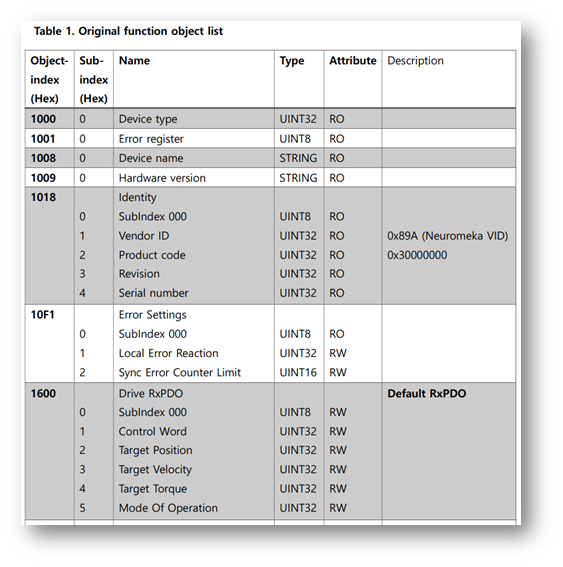 Figure 1. Original function object list
Alternative function object list:
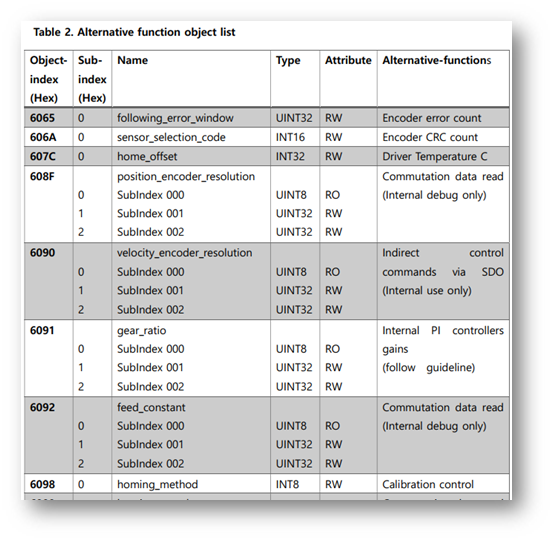 Figure 2. Alternative function object list
Index: standard index of object, in hexadecimal Sub-index: each object may have several sub-objects, this is index of each sub-object exist in this object Name: standard object name, it tells object function Type: data type of an object Attribute: access right in OP mode Description: more explanation for object
Slave process data (PDO)
PDO data is cyclically sent/received between master and slave devices. This is realtime communication data. Neuromeka CORE provides maximum PDO transmission speed is up to 20 kHz (50 us). CORE doesn’t support PDO assign and configuration, user must use default configuration assigned by manufacturer. Default PDO mapping is oriented for motion control, therefore pre-configured objects only serve motion control purpose (position, velocity, torque). For other driver information, like temperature, user should access via SDO.
Default PDO mapping
RxPDO Default RxPDO object ‘Drive RxPDO’ with index of 0x1600 is mapped at sync-manager 2 (SM2). There are 5 pdo entries located on RxPDO.
| PDO Name | Entry | ||||
|---|---|---|---|---|---|
| Drive RxPDO | Index | Sub-index | Bit len | Name | Data type |
| 0x6040 | 0 | 16 | controlword | UINT | |
| 0x607a | 0 | 32 | target_velocity | DINT | |
| 0x60ff | 0 | 32 | target_velocity | DINT | |
| 0x6071 | 0 | 16 | target_torque | INT | |
| 0x6060 | 0 | 8 | modes_of_operation | SINT | |
Table 1. Default RxPDO mapping
TxPDO Default TxPDO object ‘Drive TxPDO’ with index of 0x1A00 is mapped at sync-manager 3 (SM3). There are 7 pdo entries located on TxPDO.
| PDO Name | Entry | ||||
|---|---|---|---|---|---|
| Drive TxPDO | Index | Sub-index | Bit len | Name | Data type |
| 0x6041 | 0 | 16 | statusword | UINT | |
| 0x6064 | 0 | 32 | position_actual_value | DINT | |
| 0x606c | 0 | 32 | velocity_actual_value | DINT | |
| 0x6077 | 0 | 16 | torque_actual_value | INT | |
| 0x6061 | 0 | 8 | modes_of_operation_display | SINT | |
| 0x6078 | 0 | 16 | current_actual_value | INT | |
| 0x60e4 | 0 | 32 | additional_position_actual_value | DINT | |
Table 2. Default TxPDO mapping
CiA402 state machine
- CORE implemented CoE CiA402 motion profile, SERVO-ON, SERVO-OFF are controlled according to CiA402 state machine.
- Three state groups:
- Power disabled: driver voltage was not enabled yet
- Power enabled: high voltage is available
- Fault: any alarm signal will cause driver to fault states
- Rectangle blocks are driver states.
- Yellow highlighted numbers are state transition paths.
 Figure 3. CiA402 state machine diagram
Driver states
| Driver states | Description |
|---|---|
| Not Ready to Switch On | Initial state, very quickly pass after power on |
| Switch On Disabled | Initiation has been completed, servo is in off state |
| Ready to Switch On | From off state, servo is commanded by control word |
| Switched On | Main voltage has come, ready for enabling |
| Operation Enable | Fully enabled, servo is in operation |
| Quick Stop Active | Servo drive stops in pre-defined method |
| Fault Reaction Active | Servo is on but an alarm is detected, soon servo will go to off state |
| Fault | Servo off |
Table 3. Driver states summary
Driver state is indicated by Statusword object. In order to change from one to another state master should send a corresponded Controlword value.
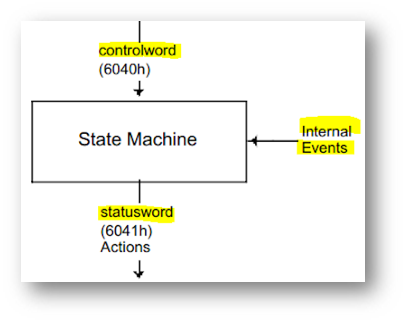 Figure 4. CiA402 state machine diagram
Control word (object 0x6040)
Set by user, change the drive states.
| Index | 0x6040 |
|---|---|
| Name | controlword |
| Object code | VAR |
| Data type | UINT |
| Access | RW |
| PDO mapping (pre-mapped) | Yes |
| Units | - |
| Range | - |
| Default value | 0 |
Table 4. Description of controlword
Controlword is bitwise object, each bit has its own control meaning. Several bits are mandatory (M) while others are optional (O)
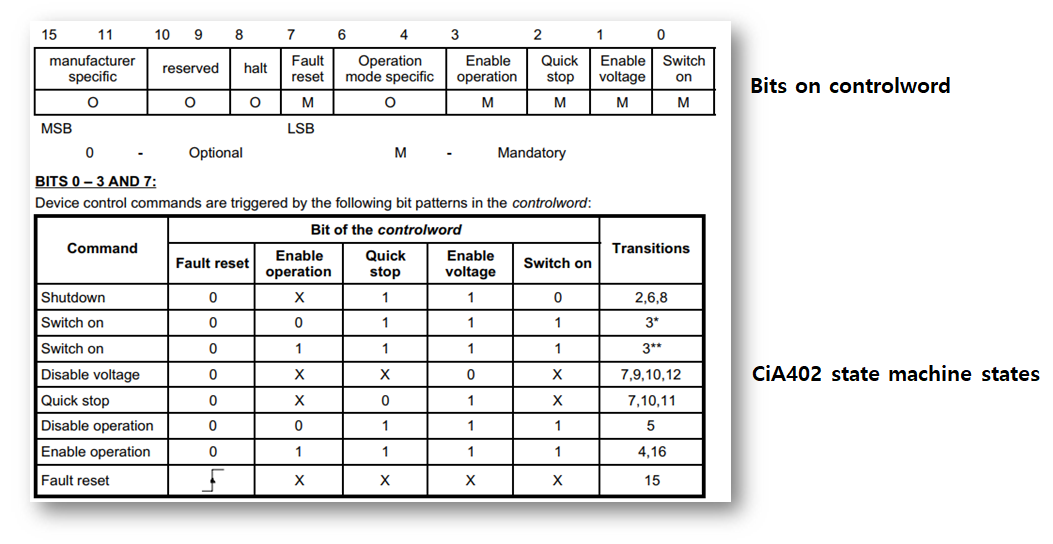 Figure 5. Detail information of Controlword
Status word (object 0x6041)
Set by drive internally, indicate current state of drive.
| Index | 0x6041 |
|---|---|
| Name | statusword |
| Object code | VAR |
| Data type | UINT |
| Access | RO |
| PDO mapping (pre-mapped) | Yes |
| Units | - |
| Range | - |
| Default value | - |
Table 5. Description of statusword
Statusword is bitwise defined, each bit indicates a specific state.
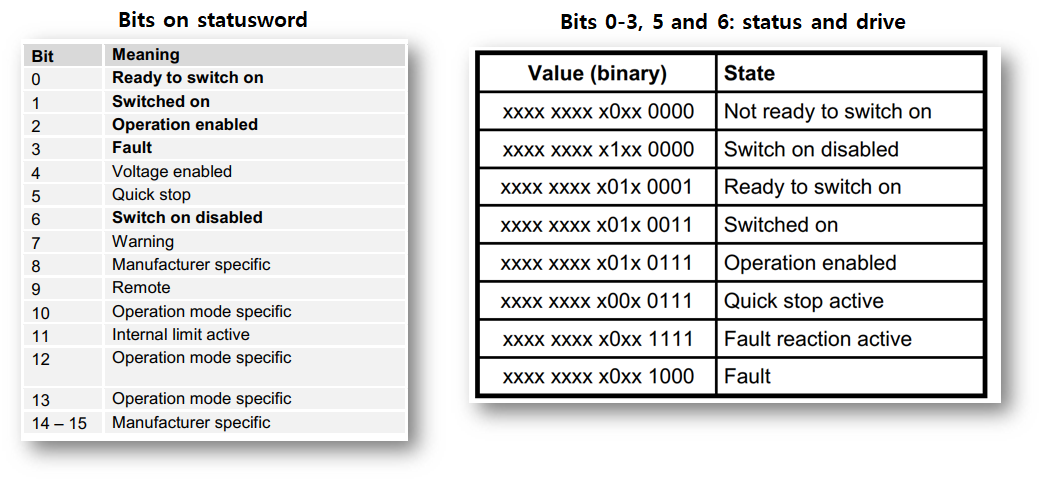 Figure 6. Detail information of Statusword
Turn on/off servo via SDO
Since all objects can be accessed via SDO, including controlword and statusword. User may turn CORE module on/off by writing suitable value for controlword via SDO. According to CiA402 state machine, a proper SERVO-ON path will be:
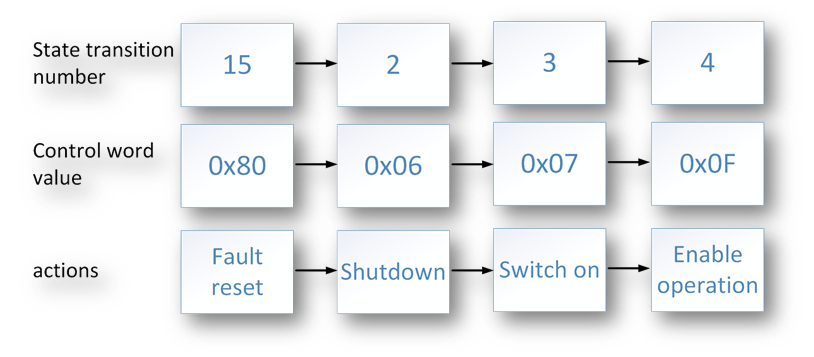 Figure 7. Servo ON path
A simplest way to turn off servo (SERVO-OFF) is to set controlword value of 0 (transition#9). It is recommended that before turn module on, mode_of_operation should be set first.
error_code (object 0x603F)
- Error_code: indicates actual error inside drive.
- Error code should be checked before starting operation and when Fault bit statusword appear.
| Index | 0x603F |
|---|---|
| Name | error_code |
| Object code | VAR |
| Data type | UINT |
| Access | RO |
| PDO mapping (pre-mapped) | No |
| Units | - |
| Range | - |
| Default value | 0 |
Table 6. Description of error_code
Available NRMK motor error codes in CORE:
| Code | Name | Description |
|---|---|---|
| 0x2310 | OVERCURRENT | Motor over current |
| 0x3110 | OVERVOLTAGE | Motor over voltage |
| 0x3120 | UNDERVOLTAGE | Motor under voltage |
| 0x3210 | DCLINK_OVERVOLTAGE | Motor DC link over voltage |
| 0x3220 | DCLINK_UNDERVOLTAGE | Motor DC link under voltage |
| 0x7310 | OVERSPEED | Motor over speed |
| 0xFF10 | LOW_BATTERY | Low battery of encoder -> replace battery |
| 0xFF11 | ENC_ERROR_BIT | Error bit of encoder |
| 0xFF12 | ENC_ERROR_CRC | CRC mismatch -> check encoder internal configuration |
| 0xFF13 | ENC_DISCON | Encoder cable disconnected |
| 0xFF14 | ENC_NORESET | Encoder auto synchronized -> power reset required |
| 0xFF20 | 5V_OVERVOLTAGE | Internal 5V is too HIGH (> 5.5V) |
| 0xFF21 | 5V_UNDERVOLTAGE | Internal 5V is too LOW (< 4V) |
| 0xFF22 | 3V_OVERVOLTAGE | Internal 3.3V is too HIGH (> 3.6V) |
| 0xFF23 | 3V_UNDERVOLTAGE | Internal 3.3V is too LOW (< 3.0V) |
| 0xFF24 | GATE_OVERVOLTAGE | Internal gate driver voltage is too HIGH (> 13V) |
| 0xFF25 | GATE_UNDERVOLTAGE | Internal gate driver voltage is too LOW (< 9V) |
| 0xFF2A | PHASE_A_LOW | Phase A current offset low |
| 0xFF2B | PHASE_A_HIGH | Phase A current offset high |
| 0xFF2C | PHASE_B_LOW | Phase B current offset low |
| 0xFF2D | PHASE_B_HIGH | Phase B current offset high |
| 0xFF2E | PHASE_C_LOW | Phase C current offset low |
| 0xFF2F | PHASE_C_HIGH | Phase C current offset high |
| 0xFF31 | MOSFET_UL_THRU | Low side MOSFET, channel U is damaged |
| 0xFF32 | MOSFET_VL_THRU | Low side MOSFET, channel V is damaged |
| 0xFF34 | MOSFET_WL_THRU | Low side MOSFET, channel W is damaged |
| 0xFF39 | MOSFET_UH_THRU | High side MOSFET, channel U is damaged |
| 0xFF3A | MOSFET_VH_THRU | High side MOSFET, channel V is damaged |
| 0xFF3C | MOSFET_WH_THRU | High side MOSFET, channel W is damaged |
| 0xFF3F | MOSFET_UNKNOWN_THRU | Some MOSFET is damaged -> over current |
| 0xFFFF | NO_DRV_BOARD | Power board is not connected to controller board |
Table 7. CORE motor error code
Cyclic synchronization torque mode (CST)
After SERVO-ON and operation mode is set to CST (10), target torque will be updated by drive. Process data timeout is 50ms: after EtherCAT state is changed to OP mode, process data must be cyclically sent to drive with period lower than 50ms. Target torque is compared to maximum torque (max_torque) value (object 0x6072) before proceed. Default value of max_torque is 2048 which is equivalent to 42.5A on CORE500. Actual motor speed is observed and compared to maximum motor speed (max_motor_speed, object 0x6080). Default value of max_motor_speed is 4600 rpm. Both max_torque and max_motor_speed can be changed by users via SDO access.
 Figure 8. Torque control loop
Miscellaneous
Data conversion
Torque (current): as mentioned in previous sections, all target_torque, actual_torque and max_torque values (called ecat_data) are measured in driver ADC ‘count’ unit. They need to be converted to meaningful physical unit (Amps, Nm) using torque constant and gear ratio.
Summary of basic information for data conversion
| CORE module | Gear ratio | Torque constant (Nm/A) | Single-turn encoder resolution (counts) |
|---|---|---|---|
| CORE100 | 101 | 0.058 | 65536 |
| CORE200 | 121 | 0.087 | 65536 |
| CORE500 | 121 | 0.0884 | 65536 |
| CORE1000 | 121 | 0.206 | 65536 |
Table 8. CORE module - Basic information for data conversion
Torque (current) data conversion
| CORE100 | ecat data | Motor current (A) | Motor torque (Nm) | CORE output torque (Nm) |
|---|---|---|---|---|
| Formula | a | I = a/96 | t = 0.058*I = 0.00060417*a | T = 101*t = 0.061004*a |
| Example | 96 | 1.0 | 0.058 | 5.858 |
Table 9. Torque (current) data conversion for CORE100
| CORE200 | ecat data | Motor current (A) | Motor torque (Nm) | CORE output torque (Nm) |
|---|---|---|---|---|
| Formula | a | I = a/96 | t = 0.087*I = 0.00090625*a | T = 121*t = 0.10965625*a |
| Example | 96 | 1.0 | 0.087 | 10.527 |
Table 10. Torque (current) data conversion for CORE200
| CORE500 | ecat data | Motor current (A) | Motor torque (Nm) | CORE output torque (Nm) |
|---|---|---|---|---|
| Formula | a | I = a/48 | t = 0.0884*I = 0.0018417*a | T = 121*t = 0.2228457*a |
| Example | 96 | 2.0 | 0.1768 | 21.393 |
Table 11. Torque (current) data conversion for CORE500
| CORE1000 | ecat data | Motor current (A) | Motor torque (Nm) | CORE output torque (Nm) |
|---|---|---|---|---|
| Formula | a | I = a/22.15 | t = 0.206*I = 0.0093002*a | T = 121*t = 1.1253242*a |
| Example | 96 | 4.33 | 0.89282 | 108.03 |
Table 12. Torque (current) data conversion for CORE1000
Position data conversion
| CORE100 | ecat data | Motor turns | CORE turns | CORE shaft angle (deg) |
|---|---|---|---|---|
| Formula | p | n = p/65536 | N = n/101= p/6619136 | A = 360*N = 360*p/6619136 |
| Example | 1241088 | 18.9375 | 0.1875 | 67.5 |
Table 13. Position data conversion for CORE100
| CORE200 CORE500 |
ecat data | Motor turns | CORE turns | CORE shaft angle (deg) |
|---|---|---|---|---|
| Formula | p | n = p/65536 | N = n/121= p/7929856 | A = 360*N = 360*p/7929856 |
| Exampl | 1982464 | 30.25 | 0.25 | 90 |
Table 14. Position data conversion for CORE200/CORE500/CORE1000
Velocity data conversion
| CORE100 | ecat data | Motor velocity (deg/s) | Motor speed (rpm) | CORE shaft velocity (deg/s) |
|---|---|---|---|---|
| Formula | y | v = 360*y/65536 | r = 60*y/65536=v/6 | V = v/101=360*y/6619136 |
| Example | 1311000 | 7201.538 | 1200.256 | 71.302 |
Table 15. Velocity data conversion for CORE100
| CORE200 CORE500 |
ecat data | Motor velocity (deg/s) | Motor speed (rpm) | CORE shaft velocity (deg/s) |
|---|---|---|---|---|
| Formula | y | v = 360*y/65536 | r = 60*y/65536=v/6 | V = v/121=360*y/7929856 |
| Example | 1311000 | 7201.538 | 1200.256 | 59.517 |
Table 16. Velocity data conversion for CORE200/CORE500/CORE1000
Brake control
By default, brake control circuit is not active, brake stop CORE from motion. There are 3 method to release brake of a CORE module
- Servo on: when CORE is in servo-on (by SDO or PDO), brake will be automatically released
- Using digital_output object: this object has 2 sub-indices (digital_output:0 and digital_output:1) in which the 2nd sub-object can be used to control brake, it is noted that this method only work when module is in servo-off state
digital_output:1 = 0xAAAA : release brake
digital_output:1 = other values: braked
- Using brake release line: each ‘Brake lines’ connector (J2) on each driver has an ‘Brake release’ line, when this line is connected to GND, brake will be release regardless motor status
