Configuration of IndySDK
Robot Execution using IndySDK
This is guidance for those who want to run the robot for the first time using pre-built component files of IndySDK.
If the installation is compete, please copy the LeanDeployment folder in /neuromeka/NRMKFoundation/ directory of the development PC (Windows) to the path /home/user/release/ in STEP as illustrated in Figure below.
Note
When users copy component files from development PC to remote server (STEP), users can use Windows Explorer or other SFTP, SCP, FTP client app such as WinSCP to perform SSH file transfer.
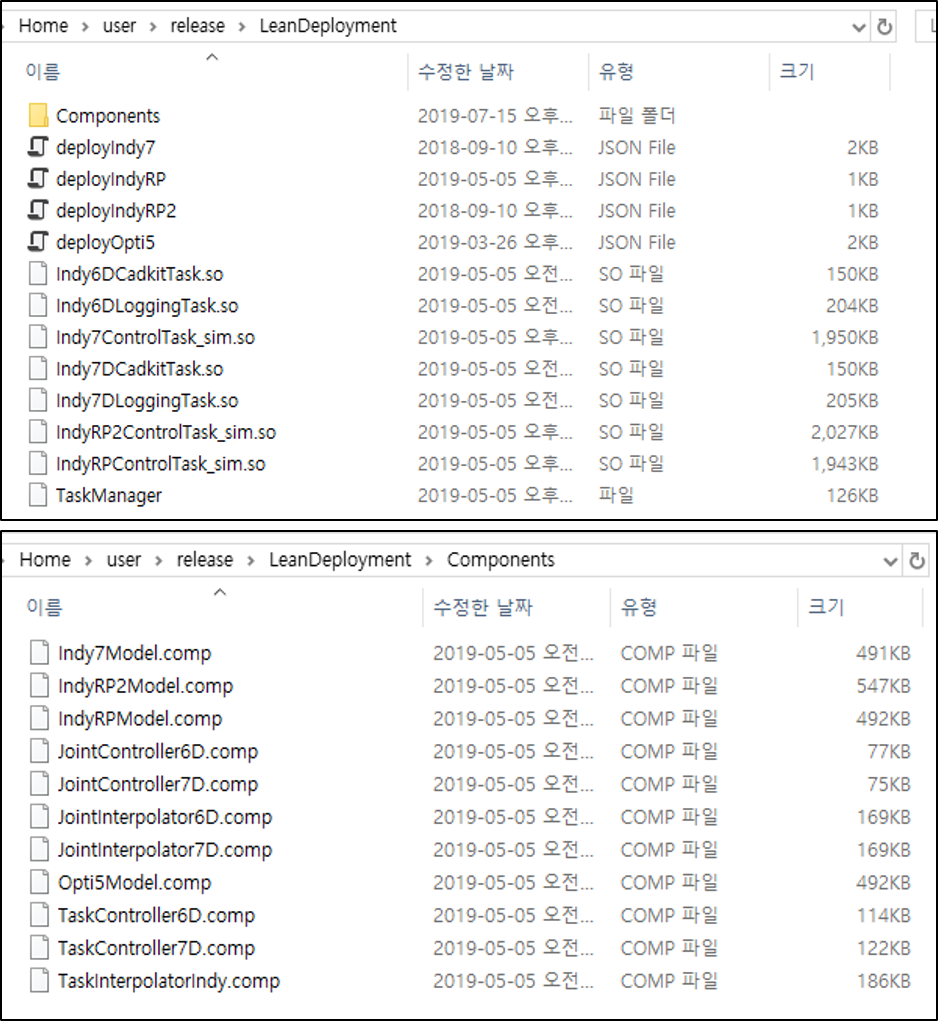
After completing the copy, log in to STEP using PuTTY (or other SSH client tool). Then, enter the terminal command as shown below.
- Set execution privilege to the TaskManager file in STEP
1 2 | |
- Execute the TaskManager with root privilege as below. Here, JSON deployment file deployIndy.json must be given as an argument of TaskManager.
1 | |
- Then, the robot turns on and Indy Framework is executed, and basic console logger appears in the terminal shown in below.
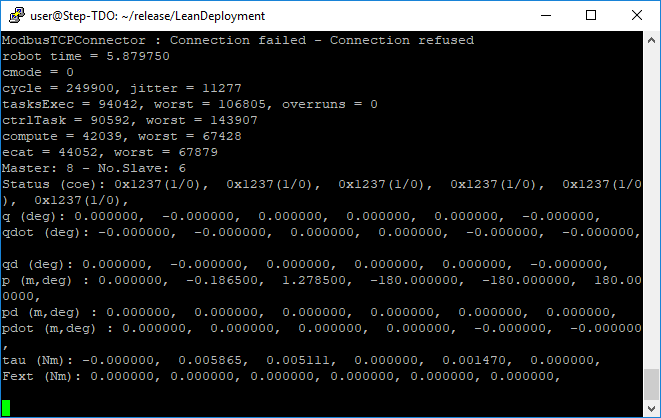
TaskManager TaskManager Display: Console Logger
- Now, users can use Conty (teach pendant) to control the robot (or virtual robot).
Note
Please refer to Indy Framework for the detailed description about TaskManager and shared library (.so file) which are execution files of Indy Framework.
JSON Deployment File
deployIndy7.json is a JSON deployment file that configures tasks when operating robot. As shown in Code 1, there are three tasks to be executed when the robot operates. Each task contains components as the element of Param.
1 2 3 4 5 6 7 8 9 10 11 12 13 14 15 16 17 18 19 20 21 22 23 24 25 26 27 28 29 30 31 32 33 34 35 36 37 38 39 40 41 | |
Example of JSON deployment file of IndySDK
- Path: The path where the shared library files are located. As shown in example, shared library files (*.so) and Component directory that contains component files (*.comp) should be located in that path.
- Queue: Pre-defined real-time task execution.
- QueueHigh has 4000Hz execution cycle. ControlTask and LoggingTask are deployed.
- QueueMedium has 20Hz execution cycle. CadKitTask is deployed.
- QueueLow has 1Hz execution cycle, and is not used.
- ControlTask will be configured by pre-built (or user-developed) five component files.
- Params: ControlTask is composed of five IndySDK component files.
- The component plug-in files (*.comp) should be located in Component folder in Path.
- When representing component plug-in file in the JSON deployment file, only file name should be specified without extension.
Note
libIndy6DControlTask.so is a task to run real robot, and libIndy6DControlTask_sim.so is a task to run virtual robot in simulation environment. Users can switch the real and simulation modes depending on their purpose.
Warning
Please verify your own control algorithm on simulation environment first, and apply it to a real robot.
IndySDK Components
IndySDK's component is a plug-in based on shared library, and is built by IndySDK development environment. Basically, IndySDK provides the following five types of component plugins:
|
|
|
|---|---|---|
|
|
|
|
|
|
|
|
|
|
|
|
|
|
|
Indy Framework changes control mode (cmode) depending on its situation. When the robot is ready state, cmode is 0. During the joint space control, cmode is 1. During the task space control, cmode is 2. During the gravity compensation, cmode is 3. Users can modify component through IndySDK, and implement low-level controllers of each cmode. Following table represents component functions called at each cmode.
control mode (cmode) |
Joint Trajectory Interpolation Component | Joint Control Component | Task Trajectory Interpolation Component | Task Control Component |
|---|---|---|---|---|
| Ready (0) |
- | computeControlTorq | - | - |
| Joint Move (1) |
traj | computeControlTorq | - | - |
| Task Move (2) |
- | - | traj | computeControlTorq |
| Direct Teaching (3) |
- | computeGravityTorq | - | - |
Component function called at each cmode
Each component can be implemented on project template provided by IndySDK. Please see below for details on each component template and related robot control functions.
1. Robot Model Component
Robot Model component contains kinematic and dynamic mathematical models of real robots and contains API functions to obtain kinematic and dynamic information. Because the APIs are defined in the abstract Robot Model class, the user can define and inherit the robot model. The APIs can be categorized into six groups according to their purpose.
| Functions | Description |
|---|---|
| TCP & Weight | Access to the TCP information including weight (kg) and displacement (m) (with respect to the last body). |
| Joint Home Position | Set/Get home position of the in joint space. |
| Forward Kinematics | Calculate the position and velocity of robot’s TCP or target coordinate (Ttarget) with respect to the reference coordinate (TReference) |
| Jacobian | Compute current Jacobian matrix and its derivative in the current robot configuration. |
| Joint Acceleration Computation |
|
| Target & Reference Coordinate |
|
Robot Model's Abstract API is shown in as following code.
1 2 3 4 5 6 7 8 9 10 11 12 13 14 15 16 17 18 19 20 21 22 23 24 25 26 27 28 29 30 31 32 33 34 35 36 37 38 39 40 41 42 43 44 45 46 47 48 49 50 | |
Abstract Robot Model Component
2. Joint Trajectory Interpolation Component
Joint Trajectory Interpolation component is used to generate a joint-space trajectory passing through all waypoints (a list of pre-defined points). The generated trajectory must satisfy all boundary conditions set by the framework. The APIs are categorized into five groups and are defined in the abstract Joint Trajectory Interpolation class. Here, DIM is a constant representing the dimension of the joint-space waypoint. The user must specify the value of DIM when developing the component.
| Functions | Description |
|---|---|
| Set Trajectory Generation Conditions | Set the conditions for the trajectory to be calculated, such as the initial time, maximum velocity and acceleration. |
| Set Waypoint List | Set the path by accepting a pointer to the waypoint array as a parameter. |
| **Compute Trajectory** |
|
| Get Trajectory Specification | Get the specification and characteristics of the trajectory. |
| Get Trajectory State | Get the current state of the trajectory, such as target reached and repeated motion. |
1 2 3 4 5 6 7 8 9 10 11 12 13 14 15 16 17 18 19 20 21 22 23 24 25 26 27 28 29 30 31 32 33 34 35 | |
Abstract Joint Trajectory Interpolation Component
3. Joint Control Component
Joint Control component takes the desired and current robot configurations in joint space and determine target torques for all joints. The calculated joint torques are sent directly to the joints’ motor drives. There are three groups of Joint Control API as shown in Table.
| Functions | Description |
|---|---|
| Configure Controller | Configure the internal characteristics of the controller. |
| Reset State | 적Reset user-defined internal variables such as integral errors. |
| **Compute Torque** |
|
1 2 3 4 5 6 7 8 9 10 11 12 13 14 15 16 17 18 19 20 21 22 23 24 | |
Abstract Joint Control Component
4. Task Trajectory Interpolation Component
Task Trajectory Interpolation component is used to generate 6D-space trajectory passing through all waypoints (a list of pre-defined points). The generated trajectory must satisfy all boundary conditions set by the framework. The APIs are categorized into five groups and are defined in the abstract Task Trajectory Interpolation class.
| Functions | Description |
|---|---|
| Set Trajectory Generation Conditions | Set the conditions for the trajectory to be calculated, such as the initial time, maximum velocity and acceleration. |
| Set Waypoint List | Set the path by accepting a pointer to the waypoint array as a parameter. |
| **Compute Trajectory** |
|
| Get Trajectory Specification | Get the specification and characteristics of the trajectory. |
| Get Trajectory State | Get the current state of the trajectory, such as target reached and repeated motion. |
1 2 3 4 5 6 7 8 9 10 11 12 13 14 15 16 17 18 19 20 21 22 23 24 25 26 27 28 29 30 31 32 33 34 35 36 37 38 | |
Abstract Task Trajectory Interpolation Component
5. Task Control Component
Task Control component takes the desired and actual robot configurations in 6-D space and determine target torques for all joints. The calculated joint torques are sent directly to the joints’ motor drives. There are three groups of Task Control API as shown in Table below.
| Functions | Description |
|---|---|
| Configure Controller | Configure the internal characteristics of the controller. |
| Reset State | Reset user-defined internal variables such as integral errors. |
| **Compute Torque** |
|
1 2 3 4 5 6 7 8 9 10 11 12 13 14 15 16 17 18 19 20 21 22 23 24 25 26 27 28 29 | |
Abstract Task Control Component
